
Ski Resort Hub
The Ski Resort hub is the mod’s single panel.
Open: Ski Resort button (top left), Universal Mod Panel, or selecting a Welcome Sign (option Open the hub when a Welcome Sign is selected).
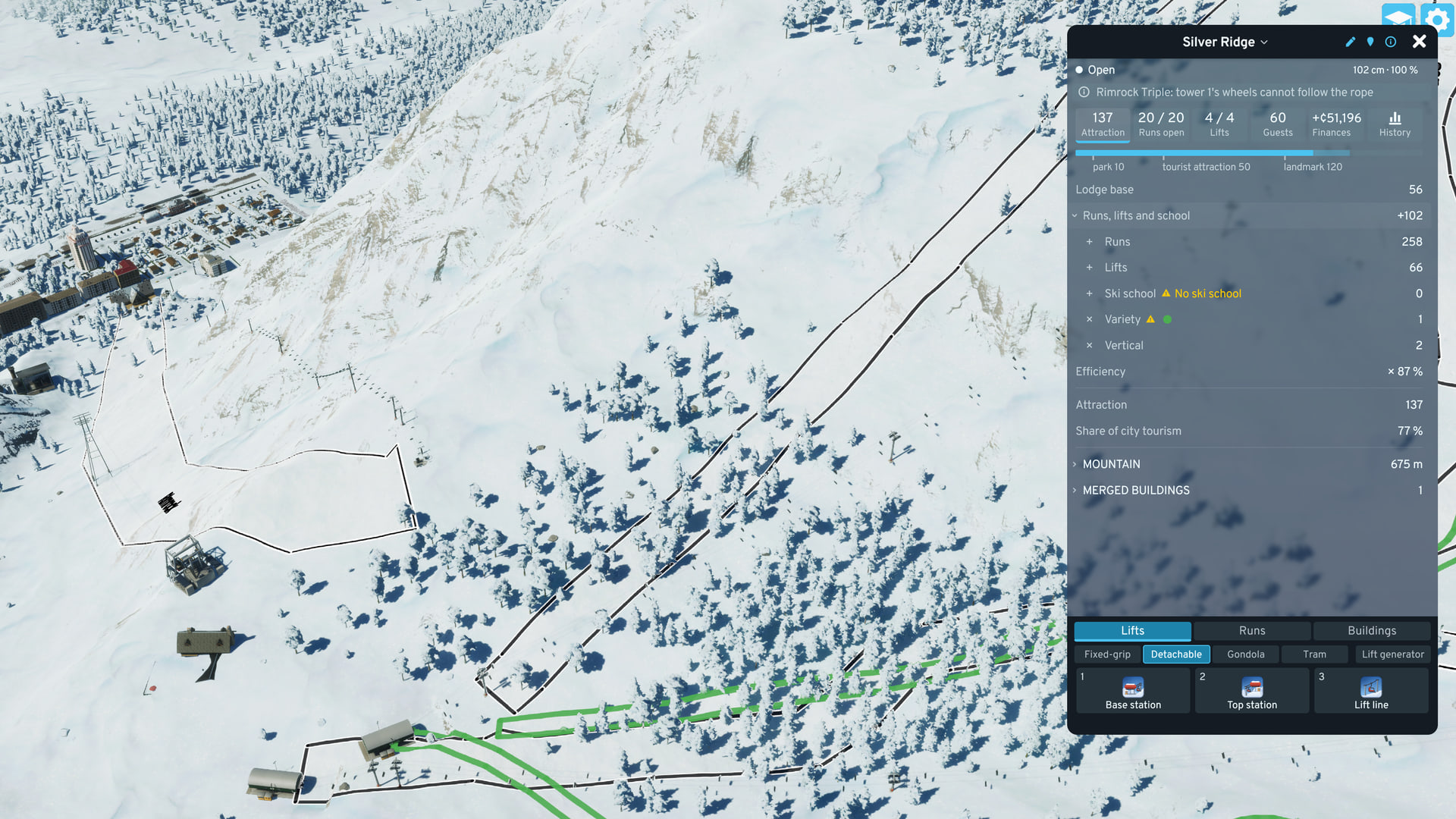
- Header: one ski area, keyed to its Welcome Sign. The name opens the list of ski areas. Pen: rename (an empty name restores the default). Info button: Symbols. Runs and lifts outside every sign’s radius (5 km by default, option Ski area radius) are listed as Not linked to a ski area and score 0.
- Status line: Open (every run is open), Patchy or Closed, with snow depth and cover, Powder day or a season warning. ≈ marks estimated snow. Tooltip: run counts by state, and whether the snow is measured or estimated. The rule: Snow Conditions.
- Problem line: the worst problem (Lodge or school: road required), with a button for the rest. Hover: why it matters, and for a missing lodge, stopped lodges or low efficiency, the attraction score once it is fixed. Click: fly to the cause. See Troubleshooting.
- Tiles: Attraction, Runs open, Lifts, Guests, Finances, History. Each opens its view.
- Start card: while the city has no Welcome Sign. Replaces all content with the four steps to a first resort.
Attraction
Section titled “Attraction”Ski area score on the game’s attraction scale, 0 to 200 (a landmark is 120). Derivation: Attraction Formula.
- Receipt: Lodge base, the fold Runs, lifts and school (Runs, Lifts, Ski school, Variety, Vertical), Efficiency and the result, Attraction. The fold’s number is the attraction scale × the square root of its terms combined. The section header tooltip has the full equation.
- Missing lines: a row tooltip ends with what the row misses, in yellow (Missing: blue run, Not in full: 2 closed · 1 no lift).
- Mountain fold: the mountain’s fact sheet. The vertical (lowest run bottom to highest run top), the run difficulty mix and the skiable area. Snow depth and run coverage. Runs by rating, with the cat tracks. Longest run, measured flat on the map. Lifts by type and Uphill capacity. Snowmaking: the share of the run area with snow guns on. Lit runs.
- Merged buildings: a fold, while the ski area has one, with the buildings merged in as lodges and their tier or state. See Merged Buildings.
- Share of city tourism: sets how many tourists come to the city, not where they go. See Tourist Draw.
Per run: a state dot, the difficulty (in the grading of option Run grading), the name, lift service (↑ column), length and drop.
- Row click: fly to the run and show its feature rows (Groomed, Snow guns, Lights) above the list. A cat track’s trash button is there too.
- Reshape: the button on the selected run opens the Run tool, which moves the corners of any run on the map. Reshaping costs nothing more.
- Also here: the Piste map switch, the tree rows while the Tree tool is on, and the Resort Planner’s rows and lift list (Resort Planner).
Per lift: a status mark, the name and a status word, then capacity (skiers per hour) and the number of runs it serves. The lift type shows while the ski area mixes types. Tooltip: length, rise, ride time and upkeep.
- Row click: fly to the lift. An unfinished lift with stations and no line yet flies to its stations.
- Status words: Running, No power, Chairs stopped, Section missing, Unfinished, Closed.
- Total row: Capacity, all lifts, summed across complete lifts with power and an open run. Its tooltip has the total length.
Guests
Section titled “Guests”Counts tourists arriving at the ski area’s lodge or Welcome Sign, and residents arriving at a lodge for leisure.
- Folds: At the lodges (Tourists, Residents. The Tourists tooltip counts the tourist groups), Ski-day trips (Reached a lodge, with the state line) and Lift tickets (Paid, Season pass, Lessons). The ticket money is in Finances.
- Tourists drawn ≈: the tourists the ski area adds to the city at one time, from the game’s tourist formula. Not guests a month: each tourist skis at most once a game day.
- Car spaces: one row per active lodge with a road: its car spaces within 600 m. Lodges of one building type are numbered (Chalet 1, Chalet 2) unless renamed.
- State line: ski days off, closed, or Full right now, with the limiting factor (runs or lodges).
- Tourism mod replacing the game formula (such as Tourism Overhaul): notice shown, no tourist estimate.
Finances
Section titled “Finances”Three rows, as in the game’s budget panel: Income (a fold), Running costs (a fold) and Net so far. The rows in the two folds sum to the net.
- Income: lift tickets, lodge spend, season passes sold, lessons.
- Running costs: lifts, runs, building upkeep, staff wages, and Ski bus while the ski area has a Ski Bus Depot.
- Excluded from net: pass holders skiing free, and City tourist income (estimate of extra tourist spend elsewhere in the city).
- Buildings and wages: today’s rate, prorated to the share of the month elapsed.
- Economy panel mapping: Economy.
History
Section titled “History”Guests, finances and attraction per month.
- Scope: This ski area or Whole city (every ski area that exists now). The history of a deleted ski area goes with it.
- Ranges: 12 months, This season vs last (last season’s same months in gray behind), or By season (one bar per season, the average month, so incomplete seasons compare fairly).
- Charts: guests and finances, always both. With This ski area, an Attraction strip under them shows the score, and on hover the snow, when each month closed.
- Faded bars: partial months. Hatched slots: nothing recorded.
- First month: closes at the end of the month the ski area starts in.
Build Strip
Section titled “Build Strip”Three tabs along the bottom hold every tool: a row of chips, a row of tiles and a status line. The strip stays open while a tool it started is in use.
- Lifts: chips for the lift type (Fixed-grip, Detachable, Gondola, Tram) and the Lift tool (Ctrl+Shift+L). Tiles: Base station, Top station, Lift line. Tile icons:
- Runs: tiles Run (Run Features), Cat track (Ctrl+Shift+K, Cat Track Tool) and Fence (the Safety Net Fence, decorative orange netting). Chips: Tree tool, Resort Planner, Delete cat tracks and Ski way (narrow cut-only cat tracks, Ctrl+Shift+J in the cat track tool). Tile icons:

- Buildings: chip Lodges: the Welcome Sign (Sign) and the five lodges. Chip Services: the Ski Bus Depot, the Ski School and the two patrol buildings. Chip Mergeable buildings: see Merged Buildings.
- Padlock: the tile is not available yet. Click it: the status line gives the reason.
- Yellow dot: one at a time. It marks the tile that solves the first problem on the problem line (with no Welcome Sign: the Sign tile). When that tile is on another tab or behind another chip, the dot sits on the tab or the chip.
Hub Symbols
Section titled “Hub Symbols”Short hub lines (missing lines, counts, run ratings) use these symbols for words. A tooltip with symbols shows their key, and the header’s Symbols button shows the whole table. Power and snow use the game’s own icons in the hub, drawn here.
| Symbol | Word | Meaning |
|---|---|---|
| Run ratings | ||
 | green | A green run: the easiest rating. |
 | blue | A blue run: the middle rating. |
 | black | A black run: a difficult rating. |
 | double-black | A double-black run: the steepest rating, for experts. |
| Run states | ||
 | open | Open: enough snow on 60 % of the run. The run scores in full. |
 | patchy | Patchy: between open and closed. The run scores part of its value. |
 | closed | Closed: snow on under 40 % of the run. The run scores nothing. |
 | open or patchy | Open or patchy: a run that adds to the score. |
| Ski area | ||
 | ski school | Ski school: an active ski school adds 12 to the score while a green run is open or patchy. |
 | lift | Lift: any lift type. A run needs a lift to score in full. |
| City services | ||
 | power | Power: the city's electricity. A lift without power stops. |
 | snow | Snow: the depth and the cover of snow on the runs. |